


How it works
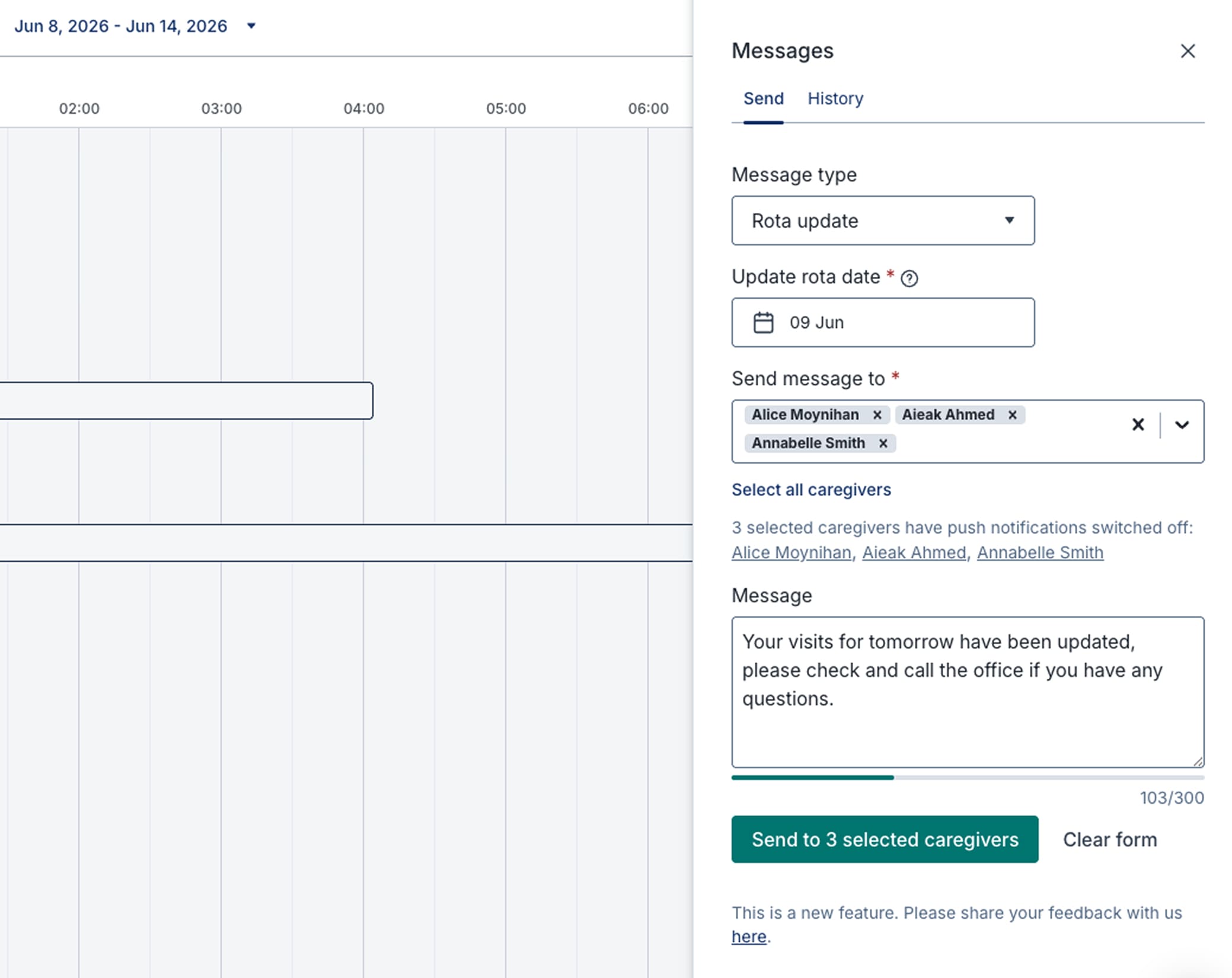
1. Choose your message and recipients
Select a message type, draft your update, and choose whether one carer, a group, or your whole team receives it.
2. Send it directly to their phone
Care professionals receive a push notification instantly, with the full message accessible inside the Birdie Carer App.
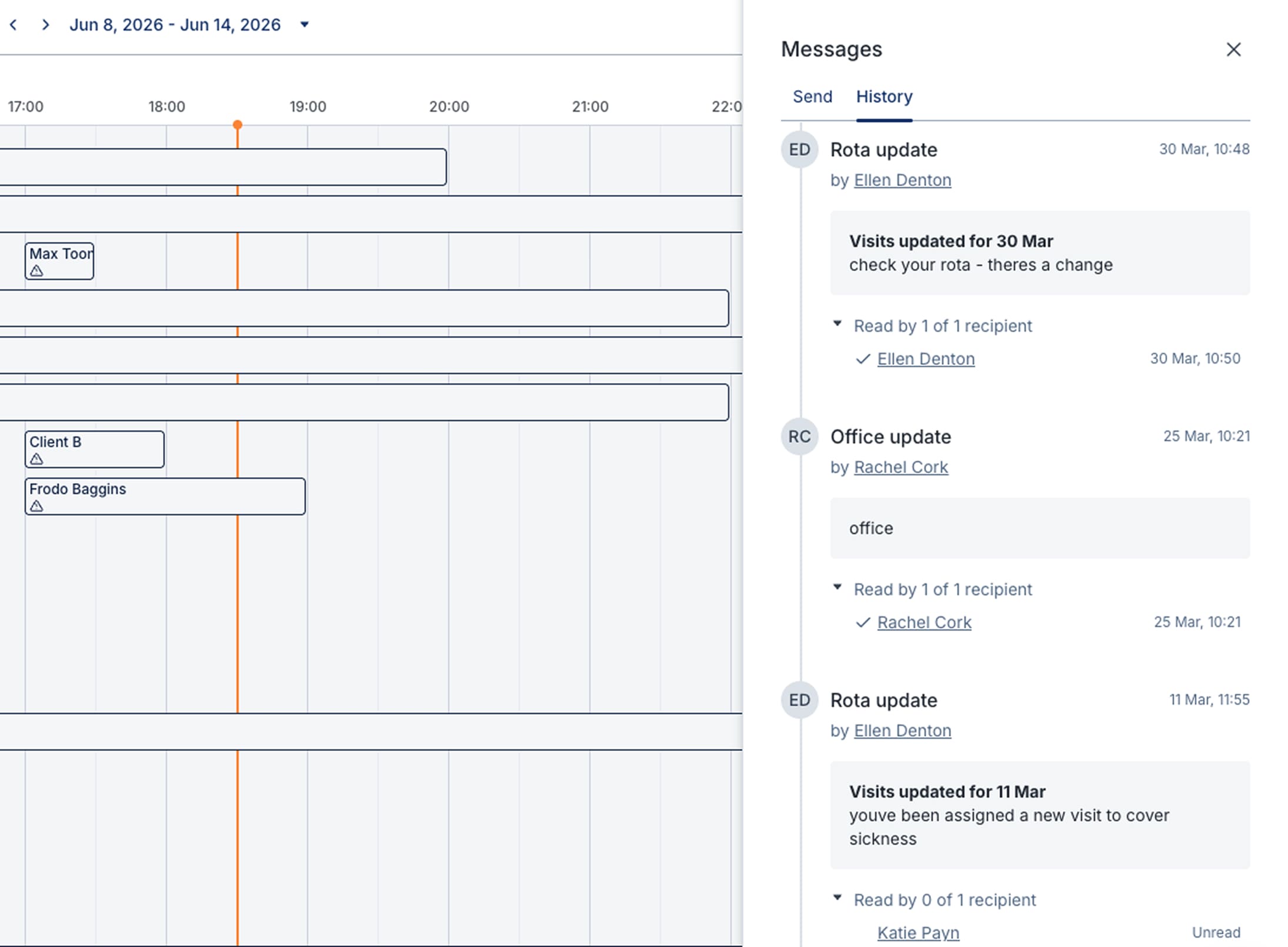
3. Confirm it's been seen
Read receipts show you exactly who has opened your message, so you know important updates have landed.
How it helps
Reach the right people at the right time
Send targeted updates to one carer or your entire team in seconds, so no one is left without the information they need before a visit.
- Send messages to one carer, a selected group, or your entire team
- Choose from a range of message types including rota updates, client updates, office updates and more
- Push notifications alert care professionals on their phone the moment a message is sent
- Messages are one-way, keeping communications clear and auditable rather than lost in group chat threads
.jpg)
Keep sensitive information secure
All communications stay within the Birdie platform, so updates about the people you care for never pass through WhatsApp, personal texts, or third-party apps.
- Messages are sent from the Agency Hub and only accessible to recipients through the Birdie Carer App
- Message content stays hidden on a care professional's lock screen and only appears once they open the app
- Read receipts confirm when each message has been opened, so urgent updates are never left unacknowledged
- Replace fragmented text and WhatsApp threads with one secure, auditable channel for outbound communication
Build an audit trail that holds up at inspection
Every message is logged, timestamped, and searchable, giving you the evidence you need for a CQC inspection or internal review.
- Every message is attributed to the sender and linked to the relevant visit or person receiving care
- Search and filter your full message history to surface exactly what was sent and when
- Demonstrate responsiveness without trawling through emails, group chats, or paper records
- Evidence timely communication across your whole team from one accessible place in the Agency Hub
"I love this feature - when you just need to send the staff a short and concise message, asking them to check something, or remind them of something, it is invaluable. We previously had to rely on text messages or WhatsApp for transferring this type of information but that means you have to have a mobile to hand and the other management cannot see the correspondence - this is much more visible to the other managers and I am sure far more secure."


Birdie Carer App
Put client information, tasks, medication schedules and more at carers' fingertips.

Digital body maps
Administer topical medication, record injuries - and act on them fast.

Frequently asked questions
What is the Message Centre?

Birdie's Message Centre lets you send notifications directly to your care professionals' phones in real time from the Agency Hub. You can message one person, a selected group, or your whole team at once. Read receipts let you confirm messages have been seen, and a searchable message history gives you a clear record of all communications linked to visits and people receiving care.
What types of messages can I send?
You can choose from a range of message types - including rota updates, client updates, office updates, Training and HR updates, and more - before drafting your message and selecting who receives it. Once sent, care professionals receive a push notification on their phone straight away.
Will messages appear on a care professional's phone?
Yes. Care professionals receive a push notification letting them know they have a new message. To protect the privacy of the people they care for, the message content stays hidden on the lock screen and only appears once they open the Birdie Carer App. This means sensitive information is never visible to anyone who might glance at their phone.
Can care professionals reply to messages?
The Message Centre is designed for outbound communication. Messages are sent from the Agency Hub to care professionals, but care professionals cannot reply through the app. This keeps your communications clear, auditable, and free from the back-and-forth of group chats or messaging threads. This is based on feedback from our co-development partners throughout the product development process. For more on how we build, visit the Smarter Care Lab.
Can I see who has read a message?
Yes. Read receipts in the Message Centre show you when each care professional has opened a message. This gives you confidence that important updates, such as urgent visit changes or safety information, have been received before a carer arrives.
Is the Message Centre more secure than WhatsApp or text messages?
Yes. Unlike WhatsApp or personal texts, the Message Centre keeps all communications within the Birdie platform. Sensitive information about the people you care for never passes through personal messaging apps, group chats, or third-party services - it stays within the secure Birdie platform. Every message is timestamped, attributed to the sender, and linked to the relevant visit or care recipient, giving you a clear audit trail for CQC inspections or internal reviews.
Ready to work smarter, not just harder?
Transform your homecare agency with technology that connects, informs, and supports your team every step of the way.
Lorem ipsum dolor sit amet, consectetur adipiscing elit. Suspendisse varius enim in eros elementum tristique. Duis cursus, mi quis viverra ornare, eros dolor interdum nulla, ut commodo.
.svg)
99.9% uptime
99.9% uptime
99.9% uptime
99.9% uptime